


Frequently Asked Question
Learn how to use our plugins with step-by-step guides and practical examples
Settings
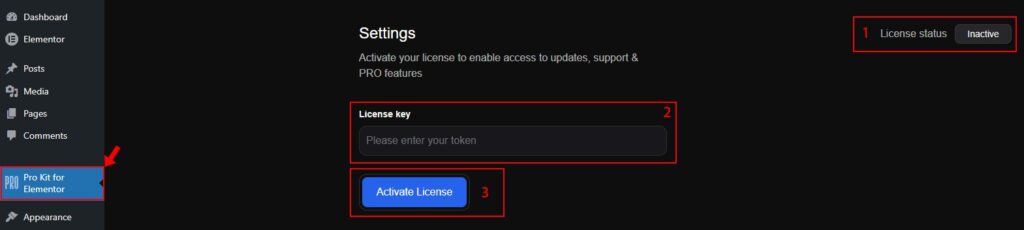
To activate the Pro Kit for Elementor plugin:
- Go to the Pro Kit for Elementor menu in the WordPress admin panel.
- Open the Pro Kit for Elementor → Settings page.
On the Settings page, you can:
- Check the license status (by default, it is Inactive).
- Enter your activation key.
- Click Activate License.
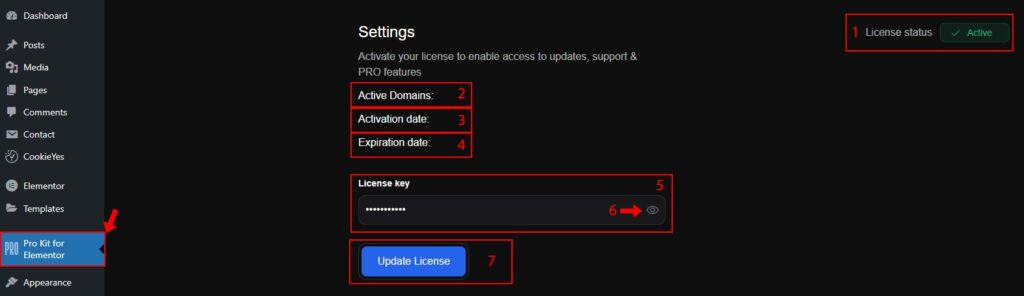
After you activate the license, the page will automatically reload. You will then see:
- Updated license status (Active).
- The number of active domains available based on your selected plan.
- Plugin activation date.
- License expiration date.
- The license key field.
- An option to reveal your activation key by clicking the icon inside the field.
- If your license has expired, you can renew it by entering a new activation key in the same field and activating it again.
 Install Plugin using FTP